[PostgreSQL] Truncate Table and Reset Sequence

If we need that after TRUNCATE table, also reset the SEQUENCE then we can do this step :

1. Set the minimum value of the sequence

alter sequence mytable_id_seq minvalue 0 start with 1;

2. Now either reset it:

SELECT setval('mytable_id_seq', 0)

OR we can reset it while truncating:

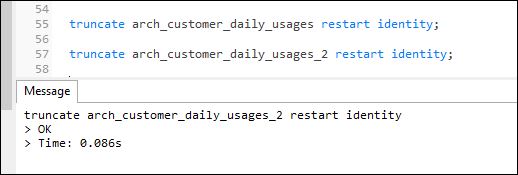
truncate mytable restart identity;

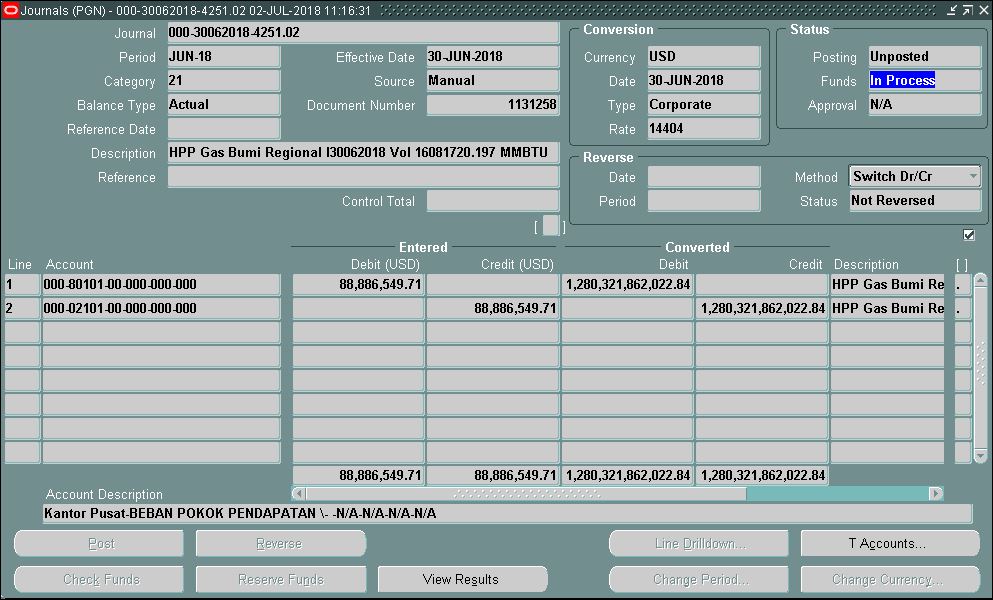
[Oracle EBS] GL Journals Stuck With Funds Status In Process

Our finance team has an issue with their journals. The GL Journal Batch is stuck with Funds Reservation “In Process”. This journal cannot be posted or edited.

 
CAUSE
The issue usually has been caused by getting a connection/network error or PC hanging while in the process of reserving Funds for a GL Journal Entry.

SOLUTION
A datafix has been required to fix these issues. The datafix essentially clears out gl_bc_packets & gl_bc_packet_arrival_order of any fund reservation entries for the batch & sets the je batch back to an an unreserved status.  Then the user should take another shot at reserving the journal.
To fix the problem Journal Entries follow these steps.

1.  Get the JE_BATCH_ID using the batch NAME from GL_JE_BATCHES.

         SELECT JE_BATCH_ID
         FROM GL_JE_BATCHES
         WHERE NAME = '000-30062018-4251.02 02-JUL-2018 11:16:31'

2.  Delete all of the records out of GL_BC_PACKETS
         
         select * from gl_bc_packets where je_batch_id='3219763'
        
         DELETE GL_BC_PACKETS WHERE JE_BATCH_ID = '3219763'
        

3.  Change the BUDGETARY_CONTROL_STATUS = R in the GL_JE_BATCHES table @
for the specific JE_BATCH_ID.
        
         select * from GL_JE_BATCHES WHERE JE_BATCH_ID = '3219763' --status asli U
        
         UPDATE GL_JE_BATCHES
         SET BUDGETARY_CONTROL_STATUS = 'R' WHERE JE_BATCH_ID ='3219763'

Reference : 

Manajemen Risiko Keamanan Data

Akses jaringan internet di lingkungan kerja, serta kebebasan dalam menggunakan perangkat seperti MP3, USB, flashdisk, CD dan lainnya di kantor menjadikan kejadian pencurian data rentan terjadi. Oleh karena itu, perusahaan perlu mengambil sejumlah langkah untuk mengamankan data di lingkungan kerja.
Data merupakan sesuatu yang sangat vital bagi bisnis. Jika data sensitif sampai jatuh ke tangan yang salah dan kemudian disalahgunakan, dampaknya bisa sangat buruk, seperti pelanggan atau nasabah diambil alih, rahasia perusahaan diketahui, sehingga dapat mempengaruhi daya saing bisnis dalam industri.

Berikut ini adalah tahap-tahap yang dapat Anda lakukan dalam mengelola risiko keamanan data di lingkungan kerja.

1. Pengukuran Risiko
Pertama, lakukan risk assessment, yakni pengukuran risiko. Lakukan analisa mengenai risiko-risiko data apa saja yang mungkin dicuri, peran karyawan mana saja yang terekspos terhadap risiko, juga analisa bagaimana kebijakan teknologi di lingkungan kerja.

Pada umumnya, data-data yang rentan untuk dicuri antara lain adalah:
- Informasi rahasia
- Rahasia dagang
- Informasi hubungan dengan pelanggan, supplier, dan partner bisnis lainnya
- Informasi hubungan dengan prospek pelanggan
- Informasi mengenai tenaga kerja, dan skill-nya

2. Analisa dan Langkah Mengelola Risiko
Selanjutnya, analisa karyawan mana saja yang berpotensi untuk menghadirkan risiko tersebut. Biasanya adalah karyawan yang bisa langsung mengakses data dan informasi tersebut di atas, yang pada umumnya tidak tersedia secara bebas di perusahaan. Untuk mencegah risiko yang datangnya dari karyawan, maka dalam klausul kontrak dapat dimasukkan mengenai batasan-batasan bagi karyawan dalam mengakses dan memperlakukan data dan informasi tersebut.

Misalnya, karyawan tidak diperkenankan untuk membawa data dan informasi keluar dari kantor, kemudian seluruh hasil pekerjaan yang dilakukan oleh karyawan adalah milik kantor dan tidak boleh dibawa ketika karyawan sudah tidak bekerja disana lagi, tidak boleh dibagi dengan orang lain, dan sebagainya. Anda juga harus membuat konsekuensi yang jelas mengenai pelanggaran peraturan ini.

Lalu bagaimana dengan kebijakan mengenai penggunaan hardware dan software yang selama ini dikeluarkan oleh kantor? Apakah kontrolnya sudah efektif? Hardware dan software merupakan perangkat yang menyimpan data-data Anda, sehingga perlu diterapkan kebijakan dan kontrol yang ketat. Berikut ini adalah langkah-langkah yang dapat Anda ambil dalam mengelola risiko keamanan data.

Selalu gunakan password untuk mengakses database, dokumen dan file yang mengandung data dan informasi yang sensitif. Ini perlu untuk membatasi supaya hanya orang-orang tertentu saja yang dapat mengakses data dan informasi tersebut.

Amankan jaringan Anda dengan firewall dan antivirus, untuk mencegah pihak luar atau hacker menyusup ke dalam jaringan kantor Anda; mengirimkan trojan, virus atau spyware; dan mencuri data dan informasi yang sensitif.

Terapkan kebijakan penggunaan hardware yang ketat, seperti melarang perangkat eksternal seperti flash disk, MP3 player, hard disk external, CD, dan sejenisnya yang dapat digunakan untuk menyimpan data. Jangan ada CD/DVD writer, kecuali beberapa PC yang digunakan khusus untuk itu dan dikelola administrator. .

Anda juga dapat mengurangi risiko dalam menyimpan data sensitif dengan cara membuang data-data yang sudah tidak digunakan lagi. Namun Anda harus menyortir dengan ketat, jangan sampai data yang masih diperlukan oleh divisi lain terbuang. Sesuaikan juga dengan regulasi, yang mungkin mensyaratkan Anda untuk menyimpan data-data tertentu.

Kadang, perusahaan juga punya partner outsourcing yang menyimpan data-data, termasuk data sensitif. Jika demikian, maka tugas perusahaan harus menjamin bahwa partner outsourcing dapat menjaga data-data tersebut dengan serius. Mereka juga harus memahami konsekuensi jika data tersebut bocor ke tempat lain.

Data sensitif biasanya dijaga oleh karyawan-karyawan tertentu saja yang berkepentingan. Karena data itu begitu penting, oleh karena itu Anda harus memberikan reward yang pantas juga bagi karyawan tersebut, supaya memastikan bahwa karyawan tersebut menjaga datanya dengan baik. Jika tidak demikian, maka karyawan tersebut bisa saja lengah atau malah tergoda untuk menjual data ke pihak lain.

Terakhir, masalah mengamankan data ini, karena sifatnya strategis, maka harus dibangun awareness kepada seluruh karyawan di organisasi. Perusahaan harus menekankan pentingnya menjaga data sesuai dengan kebijakan dan prosedur yang sudah berlaku, serta konsekuensinya jika terjadi pelanggaran.

[Oracle EBS] Fixed Asset Error APP-OFA-48392 in Asset Workbench


We have some issue when attempting to add a new asset in Assets Workbench, the following error occurs.

ERROR
-----------------------
APP-OFA-48392 Assets Transaction upgrade is either running or incomplete for one or more reporting currencies associated with primary depreciation book.  You must first complete the upgrade before entering transactions in this book


ROOT CAUSE :

There were already assets in the FA Book when the MRC created.

SOLUTION :

[Linux] Upgrade PHP 5 to PHP 7 using Yum on Oracle RHEL 6.3 Santiago

My Apache Web Server was running PHP version 5.3. But my developer need to use PHP 7.0, because they running on Laravel Framework 5.5. So I decided to upgrade PHP 5.3 to PHP 7.0. Although this is a development web server, I don’t want to disturb the existing setup and also, I don’t want to have multiple versions on PHP installed. So it should be a pure upgrade of PHP.

My environment is :


[root@devapp etc]# cat /etc/redhat-release
Red Hat Enterprise Linux Server release 6.3 (Santiago)

Here's what I've done to upgrade PHP.
1. Configure REMI Repository
# wget https://dl.fedoraproject.org/pub/epel/6/x86_64/epel-release-6-8.noarch.rpm
# rpm -Uvh epel-release-6-8.noarch.rpm

# wget http://rpms.famillecollet.com/enterprise/remi-release-6.rpm
# rpm -Uvh remi-release-6.rpm

2. Activate REMI Repository
# yum repolist
# yum-config-manager --enable remi-php70
3. Upgrade PHP 5.3 to PHP 7.0
# yum --showduplicates list php
# yum update php

4. Verify the PHP version
# php -v

5. Restart Web Server
# service httpd restart


[Linux] Install php-mbstring On ORHEL 6.3

I am running Oracle Red Hat Enterprise Linux Server release 6.3 (Santiago) with PHP Version 5.3.3 and Apache/2.2.15 (Oracle) installed.

Problem :
Recently, I have a new apps and got some errors:

Fatal error: Call to undefined function mb_detect_encoding()


Cause:
This error occurs because the new application requires mbstring extension.

Solution:
So here is the solution.
1. Check phpinfo();
It seem that extension does not appear in phpinfo.

2. Check Extension
[root@intranet newapps]# rpm -qa | grep php-mbstring
[root@intranet newapps]# rpm -qa | grep php
php-pear-1.9.4-4.el6.noarch
php-ldap-5.3.3-3.el6_2.8.x86_64
php-common-5.3.3-3.el6_2.8.x86_64
php-xml-5.3.3-3.el6_2.8.x86_64
php-cli-5.3.3-3.el6_2.8.x86_64
php-gd-5.3.3-3.el6_2.8.x86_64
php-pdo-5.3.3-3.el6_2.8.x86_64
php-devel-5.3.3-3.el6_2.8.x86_64
php-5.3.3-3.el6_2.8.x86_64

mbstring extension is not currently installed

3. Search On Yum
[root@intranet newapps]# yum search php-mbstring
Loaded plugins: refresh-packagekit, security
==================================== N/S Matched: php-mbstring ====================================
php-mbstring.x86_64 : A module for PHP applications which need multi-byte string handling

4. Install mbstring extension
[root@intranet newapps]# yum install php-mbstring

5. Restart apache
[root@intranet newapps]# service httpd restart

6. Check phpinfo();
mbstring already installed and appear in phpinfo();
We can edit the mbstring value in /etc/php.ini


7. Check the new apps

[Oracle EBS] ORA-01591 In-Doubt Transactions


Problem :
ORA-01591: lock held by in-doubt distributed transaction.
Saat sedang melakukan query ke database oracle untuk mengambil data tertentu dengan filter/kondisi where, tau2 terjadi error. Padahal itu adalah query dengan kondisi where biasa dan tidak terlalu rumit. Saat dicoba query tanpa kondisi where, tidak terjadi error. Errornya adalah :
ORA-01591: lock held by in-doubt distributed transaction 9.4.660456
Menurut oracle, penjelasan mengenai ORA-01591, adalah sebagai berikut:
ORA-01591 lock held by in-doubt distributed transaction string
Cause: An attempt was made to access resource that is locked by a dead two-phase commit transaction that is in prepared state.
Action: The database administrator should query the PENDING_TRANS$ and related tables, and attempt to repair network connection(s) to coordinator and commit point. If timely repair is not possible, the database administrator should contact the database administrator at the commit point if known or the end user for correct outcome, or use heuristic default if given to issue a heuristic COMMIT or ABORT command to finalize the local portion of the distributed transaction.
Cause :
Kondisi error tersebut disebut dengan In-Doubt Transactions.  Error terjadi saat kita mempunyai 2 buah proses transaction yang bersamaan dan saling menunggu untuk melakukan commit atau rollback sedangkan transaction yang ditunggu sudah crash/dead sehingga kondisi commit tidak pernah terjadi sehingga terjadilah kondisi lock. Hal itu terjadi karena :
– Mesin server yang menjalankan Oracle Database crash
– Koneksi Jaringan yang terputus saat terjadi proses transaction
– Kesalahan Aplikasi.
Penjelasan lebih lengkap bisa dilihat di Oracle® Database Administrator’s Guide

Solution :
1. Masuk ke sqlplus atau toad atau tools lainnya, connect sebagai sysdba.

2. Jalankan querty untuk melakukan pengecekan transaction id
SQL> select local_tran_id from dba_2pc_pending;
LOCAL_TRAN_ID
———————
1.9.4.660456


3. Lakukan rollback.
SQL> ROLLBACK FORCE '9.4.660456';
Rollback complete.
SQL> EXECUTE dbms_transaction.purge_lost_db_entry('9.4.660456');
PL/SQL procedure successfully completed.
SQL> commit;
Commit complete.


4. Cek lagi
SQL> select local_tran_id from dba_2pc_pending;
no rows selected


Oke done. Problem solved.

[Oracle EBS] Query to list Reports assigned to a Responsibility

On Oracle E Business Suites, if we want to view any report that attaches to a responsibilities, we can use this following Query.

SELECT fcpl.user_concurrent_program_name "REPORT NAME",
                fnrtl.responsibility_name, frg.request_group_name,
                fcp.concurrent_program_name "CONCURRENT PROGRAM SHORT NAME"
           FROM apps.fnd_request_groups frg,
                apps.fnd_request_group_units frgu,
                apps.fnd_concurrent_programs fcp,
                apps.fnd_concurrent_programs_tl fcpl,
                apps.fnd_executables fe,
                apps.fnd_responsibility fnr,
                apps.fnd_responsibility_tl fnrtl
          WHERE frg.application_id = frgu.application_id
            AND frg.request_group_id = frgu.request_group_id
            AND frg.request_group_id = fnr.request_group_id
            AND frg.application_id = fnr.application_id
            AND fnr.responsibility_id = fnrtl.responsibility_id
            AND frgu.request_unit_id = fcp.concurrent_program_id
            AND frgu.unit_application_id = fcp.application_id
            AND fcp.concurrent_program_id = fcpl.concurrent_program_id
            AND fe.execution_method_code LIKE 'P' --'Oracle Reports'
            AND fcp.executable_id = fe.executable_id
            AND fe.application_id = fcp.executable_application_id
            AND fnrtl.responsibility_name LIKE '&Responsibility_Name'
            -- Example Resp. Name : Inventory, Vision Operations (USA)
            AND fnrtl.LANGUAGE = 'US'
            AND fcpl.LANGUAGE = 'US';

For example, we want to view the report that attaches to Global HRMS Manager Responsibilities. Just fill the value from responsibility_name variables into Global HRMS Manager :


Than the result is :


Untuk melihat Report apa saja yang menempel pada suatu responsibilities bisa menggunakan Query diatas.

[Oracle EBS] Query Period Status

Period status didalam Oracle Application (EBS / E-Business Suite) sangat penting. Karena saat mau melakukan posting maupun memproses transaksi dibutuhkan period yang open/future tergantung pada Aplikasi (modul) yang dipergunakan. Suatu perusahaan atau organisasi bisa menggunakan banyak modul seperti General Ledger, Inventory, Payables, Receivables, dan lain-lain. Jika kita ingin memeriksa status period nya open/closed di masing-masing modul tanpa harus berpindah-pindah modul, sehingga bisa menghemat waktu dan tenaga maka bisa di pergunakan query berikut ini. Yang dibutuhkan adalah application_name pada table fnd_application_tl, serta set_of_books_id, period_name pada table gl_period_statuses

SELECT gs.period_name, fa.application_name, gs.closing_status, gs.set_of_books_id,
DECODE (gs.closing_status,
'C','Closed',
'O','Open',
'F','Future',
'W','Closed Pending',
'N','Never Opened',
'P','Permanently Closed'
) "PERIOD_CLOSING_STATUS"
FROM gl.gl_period_statuses gs, apps.fnd_application_tl fa
WHERE fa.application_id = gs.application_id
AND fa.application_name IN
('Payables', 'Receivables', 'General Ledger') --fill with oracle module
AND gs.set_of_books_id = :set_of_books_d --fill with set of books id
AND gs.period_name in ('OCT-14','SEP-14') --fill with Period Nam
and closing_status in ('O','W','C')
group by gs.Period_name, fa.application_name, gs.closing_status, gs.set_of_books_id order by Period_name desc

[Linux] SSL Certificates, Private Keys and CSRs with OpenSSL

OpenSSL is an open-source implementation of the Secure Sockets Layer (SSL v2/v3) and Transport Layer Security (TLS) protocols.

Generate a Private Key and a CSR
This begins the process of generating two files: the Private-Key file for the decryption of your SSL Certificate, and a certificate signing request (CSR) file (used to apply for your SSL Certificate).
 
# openssl req -new -newkey rsa:2048 -nodes -keyout server.key -out server.csr

Generating SSL Certificates
If we would like to use an SSL certificate to secure a service but we do not require a CA-signed certificate, a valid (and free) solution is to sign your own certificates. We can Generate a Self-Signed Certificate from an Existing Private Key that we create before. This command creates a self-signed certificate (server.crt) from an existing private key (server.key).

# openssl req -key server.key -new -x509 -days 1095 -out server.crt

The -x509 option tells req to create a self-signed cerificate. The -days 1095 option specifies that the certificate will be valid for 1095 days (3 Years). A temporary CSR is generated to gather information to associate with the certificate.

[Apache] Redirect HTTP To HTTPS

If we want to redirect our web site to always be sent over SSL (HTTP TO HTTPS). We can do this :

1. Using Virtual Host
Just add this into apache config

<VirtualHost *:80>
    ServerName example.com
    Redirect / https://example.com/
</VirtualHost>


<VirtualHost _default_:443>
   ServerName secure.example.com
   DocumentRoot /usr/local/apache2/htdocs
   SSLEngine On
# etc...
</VirtualHost>

 
2. Using .htaccess

Redirect permanent /login https://mysite.example.com/login


3. Using mod_rewrite
This config can be used on .htaccess or httpd.conf

RewriteEngine On
# This will enable the Rewrite capabilities

RewriteCond %{HTTPS} !=on
# This checks to make sure the connection is not already HTTPS

RewriteRule ^/?(.*) https://%{SERVER_NAME}/$1 [R,L]
# This rule will redirect users from their original location, to the same location but using HTTPS.

[Linux] Transfer Files Or Folder Using SCP

It is very easy to transfer files on linux operating system, we can use scp (secure copy). scp allows files / folder to be copied to, from, or between different hosts. It uses ssh for data transfer and provides the same authentication and same level of security as ssh.

1. Copy from local host to remote host
scp /path/to/source-file user@remotehost:/path/to/destination-folder/


2. Copy from remote host to local host
 scp username@remotehost:filename /some/local/folder

3. Copy from remote host to remote host
scp username@remotehost1:/some/remote/folder/filename \ username@remotehost2:/some/remote/folder/

[Oracle EBS] Query To Find Application Name And Short Name

This query can be used to lists all the applications related information and to find the APPLICATION_SHORT_NAME of a module (eg. Payables, Receivables, Order Management, etc.)

SELECT fa.application_id           "Application ID",
       fat.application_name        "Application Name",
       fa.application_short_name   "Application Short Name",
       fa.basepath                 "Basepath"
  FROM fnd_application     fa,
       fnd_application_tl  fat
 WHERE fa.application_id = fat.application_id
   AND fat.language      = USERENV('LANG')
   --AND fat.application_name = 'General Ledger' 
 ORDER BY fat.application_name;


[Oracle EBS] Change EBS User Password Using PL/SQL

If you have a locked EBS user account or need to change the user passwords using FND_USER_PKG.changePassword API with PL / SQL then you can use the following script

declare
begin
if FND_USER_PKG.changePassword ('USERNAME','NEW_PASSWORD') 

then
 dbms_output.put_line(1); 

else 
 dbms_output.put_line(2) ;
end if;
end;


Don't forget to commit.

[Oracle Siebel CRM] Query Last User Active

Oracle Siebel CRM 8.1 use dba_users table for the application user. But the user activitiy history is stored into table at siebel schema. Here the query to get the user last active / last login date.


SELECT LOGIN, MAX(TANGGAL) LAST_TRANS_DATE
FROM (
SELECT S.LOGIN, MAX(TRUNC(PEL.LAST_UPD)) TANGGAL
FROM SIEBEL.S_ASSET_RDNG PEL, SIEBEL.S_USER S
WHERE PEL.LAST_UPD_BY =S.ROW_ID
AND EXISTS (SELECT 1 FROM DBA_USERS D WHERE D.USERNAME = S.LOGIN AND D.ACCOUNT_STATUS='OPEN')
GROUP BY S.LOGIN
UNION
SELECT S.LOGIN, MAX(TRUNC(PEL.LAST_UPD)) TANGGAL
FROM SIEBEL.S_ORG_EXT PEL, SIEBEL.S_USER S
WHERE PEL.LAST_UPD_BY =S.ROW_ID
AND EXISTS (SELECT 1 FROM DBA_USERS D WHERE D.USERNAME = S.LOGIN AND D.ACCOUNT_STATUS='OPEN')
GROUP BY S.LOGIN
UNION
SELECT UPPER(SRVR_USER_NAME) USERNAME, MAX(TRUNC(CREATED)) TANGGAL_LAST   FROM siebel.s_srm_task_hist
WHERE  UPPER(SRVR_USER_NAME) IN (SELECT USERNAME FROM DBA_USERS WHERE ACCOUNT_STATUS ='OPEN')
GROUP BY UPPER(SRVR_USER_NAME)
--ORDER BY 2
UNION
select c.username,MAX(TRUNC(a.SAMPLE_TIME))
from DBA_HIST_ACTIVE_SESS_HISTORY a,  dba_users c
where a.user_id=c.user_id
AND C.ACCOUNT_STATUS='OPEN'
AND C.USERNAME IN (SELECT LOGIN FROM SIEBEL.S_USER)
GROUP BY C.USERNAME
)
GROUP BY LOGIN

[Oracle EBS] Archive and Purge GL Balances and Journals

We can archive and purge account balances, as well as journal batches, entries, lines, and associated journal references for one or more accounting periods, provided the periods are permanently closed.

To Archive, navigate to Responsibility General Ledger Super User - Setup - System - Purge


The Archive process is move data from GL table to GL archive tables.  Data from tables is copied as below :
  • GL_balances --> GL_archive_balances
  • GL_batches --> GL_archive_batches
  • GL_je_headers --> GL_archive_headers
  • GL_je_lines --> GL_archive_lines
  • GL_import_references  --> GL_archive_references

Once the process completes, export the archive tables data to a safe place and the purge the data
References :
- Archiving Account Balances and Journal Detail
- Purging Archived Account Balances and Journals

[Oracle EBS] Purge Concurrent Request and/or Manager Data

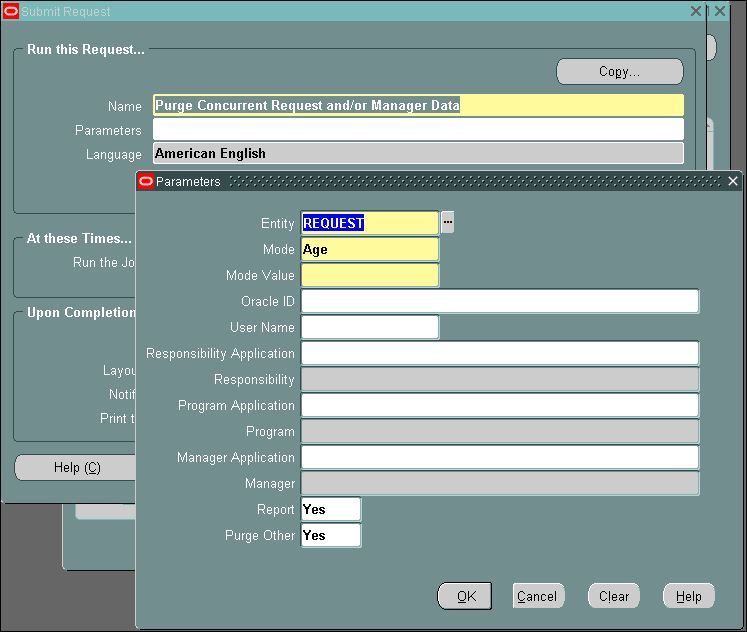
One of the important area of Concurrent Manager tuning is monitoring the space usage for the subsets within each concurrent manager. When the space in FND_CONCURRENT_PROCESSES and FND_CONCURRENT_REQUESTS exceed 50K, you can start to experience serious performance problems within your Oracle Applications. When you experience these space problems, a specific request called “Purge Concurrent Requests And/Or Manager Data” should be scheduled to run on a regular basis. This request to purge can be configured  the request data from the FND tables as well as the log files and output files on accumulate on disk.

When the tables FND_CONCURRENT_REQUESTS and FND_CONCURRENT_PROCESSES reaches above 3000-4000 rows, the performance diminishes. You have to run Purge Concurrent Request and/or Manager Data program on a regular basis depending on the amount of request being run.

Query Find Size in KB for FND_CONCURRENT_REQUESTS 
SELECT (BYTES/1024)/1024 "Size in KB" from dba_segments where SEGMENT_NAME='FND_CONCURRENT_REQUESTS';

SELECT (BYTES/1024)/1024 "Size in KB" from dba_segments WHERE SEGMENT_NAME='FND_CONCURRENT_PROCESSES';

How to run Purge Concurrent Request and/or Manager Data in oracle EBS

1. Log in to Application as System Administrator responsibility.
2. Navigate to Request> Run> Single Request
3. Query up Purge Concurrent Requests.


ENTITY = ALL   : Purge of concurrent requests, concurrent managers, request log files, manager log files and report output files. The following tables are purged
-  Fnd_Concurrent_Processes
-  Fnd_Dual
-  Fnd_Concurrent_Requests,
-  Fnd_Run_Requests
-  Fnd_Conc_Request_Arguments
-  Fnd_Dual
-  Fnd_Context_Env
-  Deletes concurrent requests’ log and out files from OS

ENTITY = MANAGER   : Purge of concurrent managers and manager log files.
The following tables are purged 
-  Fnd_Concurrent_Processes
-  Fnd_Dual
-  Deletes concurrent manager log files from OS

ENTITY = REQUEST   : Purge of concurrent requests, request log files and output files.
The following tables are purged
– Fnd_Concurrent_Requests,
– Fnd_Run_Request
– Fnd_Conc_Request_Arguments
– Fnd_Dual
– Deletes concurrent requests’ log and out files from OS

MODE : 
- AGE : Number of days.
- COUNT : Number of records

[Oracle] How To Execute INSERT Statements From File

(en)
How to execute a sql script on oracle? Use this command :

SQL> @<path>\<filename>

(id)
Cara untuk melakukan insert data ke database Oracle dari file (bisa berupa .txt maupun .sql) yang berisi insert statement, bisa menggunakan command berikut ini :

SQL> @<path>\<filename>

[Oracle EBS] Query Apply Patch Listing

Query untuk melihat list apply patch :

SELECT
    patch_name, patch_type, maint_pack_level, creation_date
FROM applsys.ad_applied_patches
ORDER BY creation_date DESC

[Oracle EBS] Query to list Reports assigned to a Responsibility

Untuk melihat Report apa saja yang menempel pada suatu responsibilities bisa menggunakan Query berikut ini :
SELECT fcpl.user_concurrent_program_name "REPORT NAME",
                fnrtl.responsibility_name, frg.request_group_name,
                fcp.concurrent_program_name "CONCURRENT PROGRAM SHORT NAME"
           FROM apps.fnd_request_groups frg,
                apps.fnd_request_group_units frgu,
                apps.fnd_concurrent_programs fcp,
                apps.fnd_concurrent_programs_tl fcpl,
                apps.fnd_executables fe,
                apps.fnd_responsibility fnr,
                apps.fnd_responsibility_tl fnrtl
          WHERE frg.application_id = frgu.application_id
            AND frg.request_group_id = frgu.request_group_id
            AND frg.request_group_id = fnr.request_group_id
            AND frg.application_id = fnr.application_id
            AND fnr.responsibility_id = fnrtl.responsibility_id
            AND frgu.request_unit_id = fcp.concurrent_program_id
            AND frgu.unit_application_id = fcp.application_id
            AND fcp.concurrent_program_id = fcpl.concurrent_program_id
            AND fe.execution_method_code LIKE 'P' --'Oracle Reports'
            AND fcp.executable_id = fe.executable_id
            AND fe.application_id = fcp.executable_application_id
            AND fnrtl.responsibility_name LIKE '&Responsibility_Name'
            -- Example Resp. Name : Inventory, Vision Operations (USA)
            AND fnrtl.LANGUAGE = 'US'
            AND fcpl.LANGUAGE = 'US';